
📢 CONTACT US FOR A FREE AUDIT, CONSULTATION, OR BRAND ANALYSIS. WE WANT TO HELP HOWEVER WE CAN 🏁 BUILD YOUR BRAND, SELL THE WOW FACTOR, AND LET US DO THE THINKING AHEAD 🧠
📢 CONTACT US FOR A FREE AUDIT, CONSULTATION, OR BRAND ANALYSIS. WE WANT TO HELP HOWEVER WE CAN 🏁 BUILD YOUR BRAND, SELL THE WOW FACTOR, AND LET US DO THE THINKING AHEAD 🧠
📢 CONTACT US FOR A FREE AUDIT, CONSULTATION, OR BRAND ANALYSIS. WE WANT TO HELP HOWEVER WE CAN 🏁 BUILD YOUR BRAND, SELL THE WOW FACTOR, AND LET US DO THE THINKING AHEAD 🧠
My Website Is Not on Google: 11 Proven Ways to Fix It
My Website Is Not on Google: 11 Proven Ways to Fix It
11 minutes read - Written by Nextus Team
SEO
Websites
Guide
How-To

It’s a specific kind of panic, isn’t it? That sinking feeling when you search for your business on Google and… nothing. Crickets. If your website is not showing up on Google, take a deep breath. The reason is almost always a simple, fixable issue. Most of the time, it boils down to one of three things: your site is too new for Google to have found it, something is actively blocking Google’s crawlers, or in rare cases, it’s been penalized. This guide provides actionable insights to diagnose and solve the problem.
Your First Steps When Your Website Is Invisible
Discovering your site is missing in action is alarming, but we can solve this. Before you start digging into complex technical settings, a couple of quick checks will usually point you in the right direction. This is all about figuring out if Google even knows your site exists, which is square one for getting seen.
The very first thing you should always do is a simple site search.
Just go to Google and type site:yourwebsite.com into the search bar (swapping in your actual domain, of course). This is a special command that tells Google, "Show me every single page you have stored for this website."
If a list of your pages pops up, that’s great news! It means Google has indexed your site. The problem isn't invisibility; it's a ranking issue. But if you see a message like "Your search - site:yourwebsite.com - did not match any documents," you've just confirmed Google hasn't indexed your site at all. Now we know what to fix.
What Is Google's Index Anyway?
To explain the jargon, think of Google's index as the world's biggest library. For anyone to find your book (your website), it first has to be cataloged and put on a shelf. That cataloging process is called indexing. If your site isn't in the index, it effectively doesn't exist for anyone using Google Search. To get a better handle on this, check out this great explainer on What is Search Engine Indexing.
To get into this massive library, you need a direct line to the librarian—and that’s where Google Search Console comes in. It’s a free, non-negotiable tool for any serious website owner. It’s your site’s health monitor, showing you exactly how Google sees your pages and flagging any errors that are keeping you out of the index.
The flowchart below breaks down the three main paths to investigate when your site has gone missing.
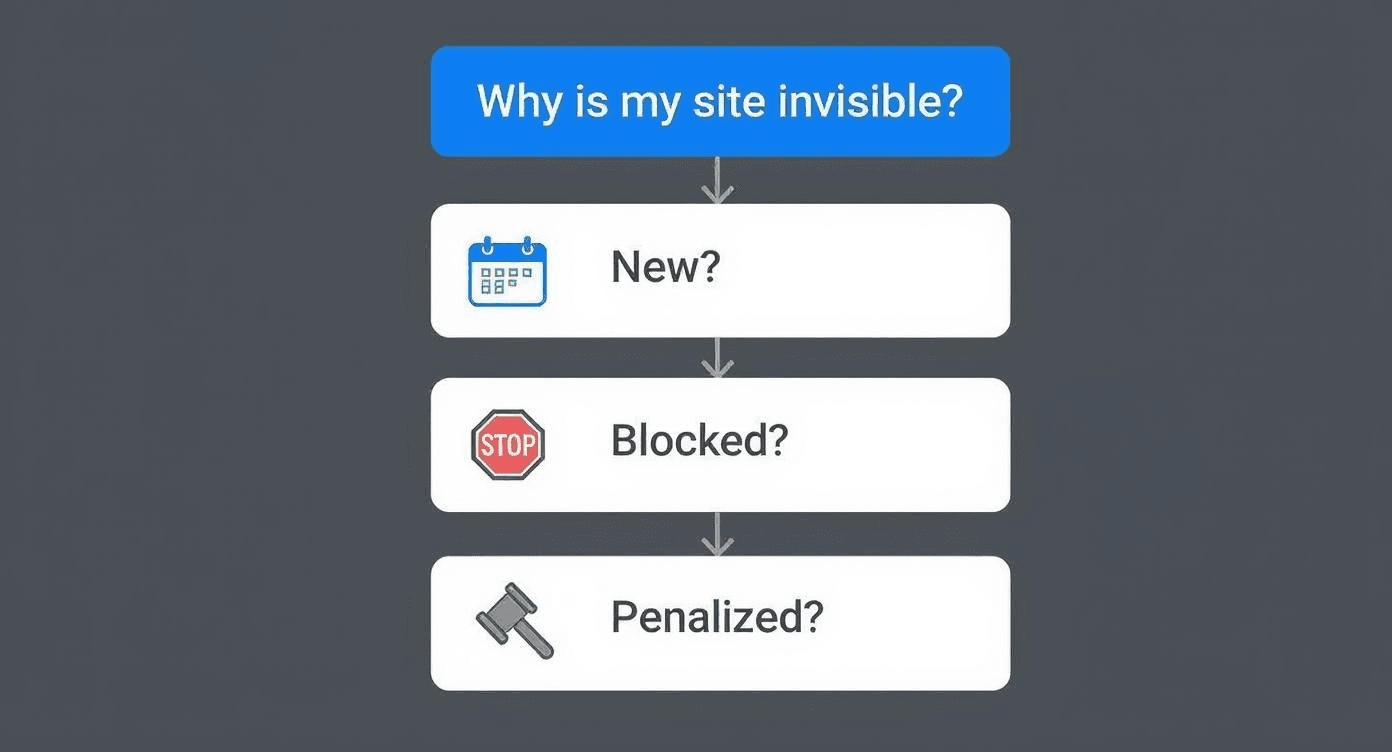
This gives you a quick visual guide to figure out if your problem is just a matter of time, a technical roadblock, or something more serious.
Quick Diagnosis for an Invisible Website
Use this table to quickly connect the dots between what you're seeing (or not seeing) and what your first move should be.
Symptom | Likely Reason | Your First Move |
|---|---|---|
| Your site isn't indexed by Google yet. | Submit your sitemap in Google Search Console. |
The website is brand new (launched in the last week). | Google's crawlers haven't found or processed it. | Be patient, but also submit your sitemap to speed it up. |
The site used to be on Google, but now it's gone. | A | Use the URL Inspection tool in Google Search Console on your homepage. |
Only some pages are missing from search results. | Those specific pages might be blocked or have issues. | Inspect the missing URLs in Google Search Console. |
This table isn't exhaustive, but it covers the most common scenarios we see and gives you an immediate, actionable starting point.
Why Your Site Is Missing
So, let’s zoom in on those three high-level reasons your website might be playing hide-and-seek with Google.
First, your website could simply be too new. Search engines need time to discover and crawl new sites, a process that can take a few days or even a couple of weeks. If you just hit "publish," a little patience is needed. That said, you can definitely give Google a nudge to speed things up. For any new launch, following a clear plan is essential—our SEO checklist for a new website is a great resource.
Second, something might be actively blocking Google. This is a surprisingly common culprit, often an accidental instruction left in your site’s code. It could be a "noindex" tag on a key page or a rule in a file called robots.txt that’s basically telling search engines to stay away. We see this happen a lot, especially right after a site migration or redesign.
Finally, while it's the least common reason, your site could have been penalized by Google for violating its quality guidelines. This is a manual action taken by a human reviewer at Google, and it’s reserved for serious offenses like spammy content or deceptive SEO practices. This is exactly why, as a top-tier Brand Identity Agency, we at Nextus build every client's website on a foundation of trust and quality—to ensure these pitfalls are avoided from day one.
Using Google Search Console to Uncover Clues
Think of Google Search Console (GSC) as your website's personal health monitor and a direct line of communication with Google itself. When your website is not showing up on Google, this free tool is the single most important place to start your investigation. It replaces guesswork with hard data, showing you exactly how Google sees your site and flagging the errors that are keeping you invisible.
If you haven't set it up yet, make that your top priority. GSC's dashboard translates what would otherwise be complex search engine behavior into insights you can actually use. For any business owner serious about their digital presence, getting comfortable with this tool is non-negotiable.
The Power of the URL Inspection Tool
The quickest way to get an answer about a specific page is with the URL Inspection Tool. This feature is basically like asking Google, "Hey, what's the deal with this exact page?" All you do is paste the URL of your missing page into the search bar at the very top of your GSC dashboard.
Google will then give you a live verdict. It’ll tell you if the URL is on Google, if it's eligible to be indexed, and if it has any crawling or mobile usability problems. If the page isn't indexed, the tool will almost always give you a clear reason—like a "noindex" tag or a server error. This should be your first diagnostic step for any piece of content that’s gone missing.
Navigating the Index Coverage Report
While the URL Inspection Tool is great for a one-off check, the Index Coverage report gives you the bigger picture. You'll find it under the "Indexing" section in the left-hand menu. This report sorts all the URLs on your site into four main buckets: Error, Valid with warnings, Valid, and Excluded.
When your site is playing hide-and-seek, the "Error" and "Excluded" tabs are where the action is. The "Error" tab lists pages Google couldn't index because of critical problems, like server errors (5xx) or pages that just don't exist (404s).
The "Excluded" tab, though, is often far more revealing. This is where you find pages Google knows about but has actively chosen not to index. Common statuses include "Discovered - currently not indexed," "Crawled - currently not indexed," and "Excluded by ‘noindex’ tag." These aren't just technical jargon; they're direct messages from Google telling you exactly what it thinks about your pages and why they're being left out of the search results. If you see your most important service pages or blog posts here, you’ve found a major problem that needs to be fixed immediately.
The Importance of a Sitemap
Finally, one of the most proactive things you can do in GSC is to submit a sitemap. A sitemap is a roadmap of your website that lists all the important pages you want Google to find. Submitting one doesn't guarantee your pages will get indexed, but it makes sure Google can discover them efficiently.
Most modern platforms like WordPress and Shopify generate a sitemap for you automatically. You can usually find it at a URL like yourwebsite.com/sitemap_index.xml. Just copy that URL and paste it into the "Sitemaps" section in GSC.
At Nextus, our SEO experts consider this a fundamental check for any new client. A missing or outdated sitemap is a shockingly common problem and an easy fix. When you combine a proper sitemap with the diagnostic insights from the Coverage and Inspection tools, you have a powerful system for solving almost any visibility issue.
For a more structured approach, our comprehensive website audit checklist can walk you through every one of these essential steps.
Finding and Fixing Technical SEO Roadblocks
Sometimes, the reason your website is playing hide-and-seek with Google isn’t some grand strategic failure—it’s a simple, technical misstep. A single line of forgotten code or a misconfigured setting can act like a digital "keep out" sign, effectively making your site invisible to search engine crawlers. This is where technical SEO comes in. It’s all about making sure there are no structural or code-based issues stopping Google from finding, understanding, and indexing your content.
These technical roadblocks are surprisingly common, especially after a website launch or redesign. Think of it like this: you can build the most beautiful storefront in the world, but if the door is locked from the inside, no customers can get in. Our job is to find that lock and get the door wide open for Google.
Checking Your Robots.txt File
Your first stop on this technical treasure hunt should be a simple text file called robots.txt. This file lives in the root directory of your website (e.g., yourwebsite.com/robots.txt) and gives instructions to web crawlers like Googlebot. Its main job is to tell them which pages or sections of your site they shouldn't crawl.
While it’s a useful tool, a small mistake here can have catastrophic consequences. A common issue we see is a "Disallow" command that is far too broad. For example, a line that reads Disallow: / is telling every single search engine bot to stay away from your entire site. We've seen this happen when a developer blocks the site during development—to prevent the unfinished version from being indexed—and then forgets to remove the command before launch. Go check your robots.txt file now.
Hunting for Rogue Noindex Tags
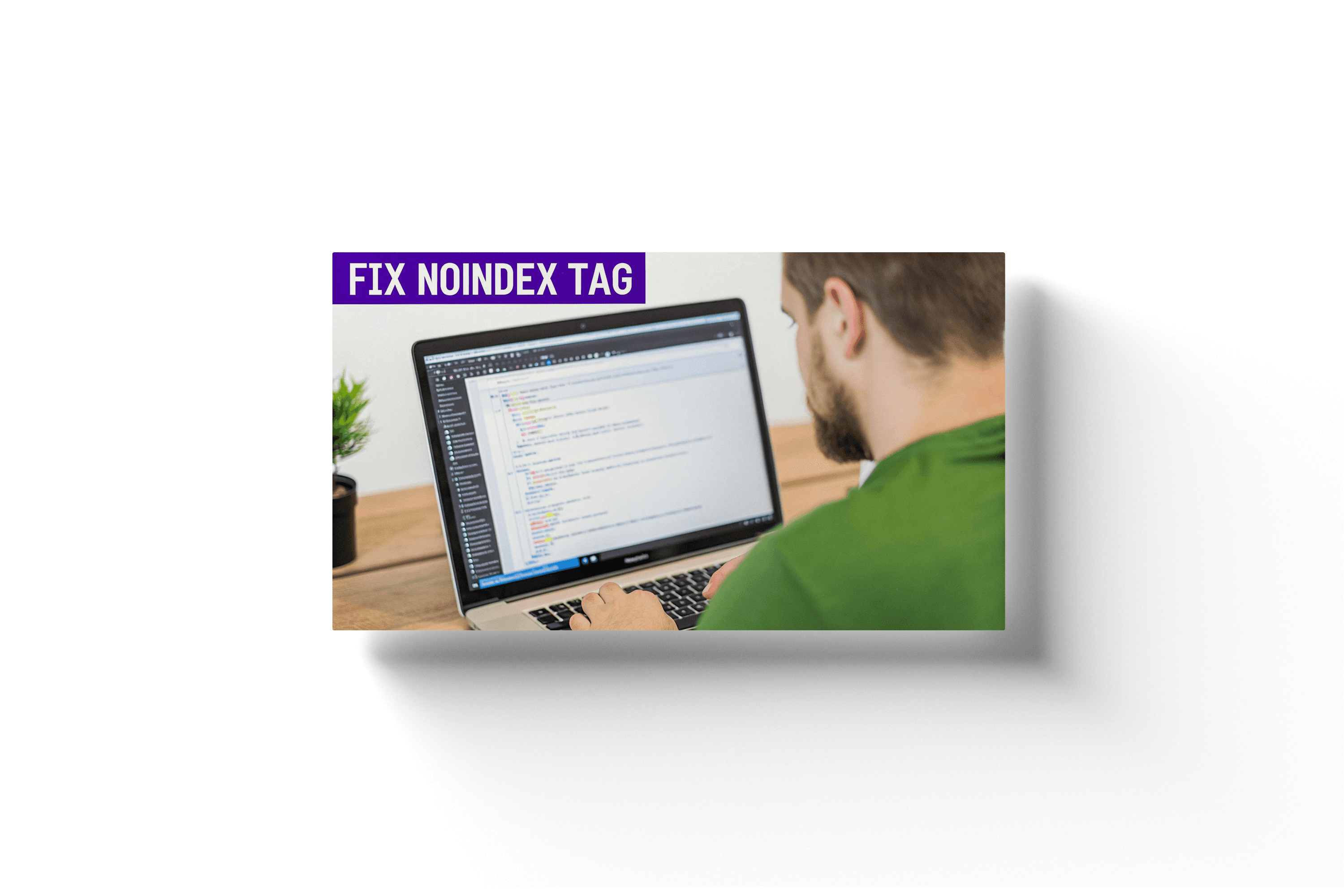
The next major culprit is the "noindex" tag. This is a meta tag placed in the HTML <head> section of a webpage. Its command is absolute: it tells Google, "You can crawl this page, but do not, under any circumstances, add it to your search index."
The problem is, it often gets applied incorrectly. A classic scenario is a checkbox in a WordPress setting—like "Discourage search engines from indexing this site"—being left checked after going live. This one click adds a noindex tag to every single page on your website. If your site:yourwebsite.com search returns nothing but GSC says Google is crawling your pages, a rogue noindex tag is the most likely reason. You can check for this by viewing the source code of your page (right-click and select "View Page Source") and searching for "noindex."
Site Structure and Internal Linking Issues
Beyond specific code commands, the very structure of your website can create roadblocks. If your site architecture is a confusing mess or lacks a clear hierarchy, Google's crawlers can get lost or just give up before they find your most important content. This is especially true for pages buried deep within your site with no clear path to reach them. These are often called orphan pages—they have no internal links pointing to them. If there are no links, Google's crawlers have no pathway to discover them. Every important page on your site should be linked to from another relevant page.
Broken internal links can also cause problems, creating dead ends for crawlers. To effectively diagnose these issues, it's crucial to use the right top SEO audit report tools to find and fix broken links and orphan pages.
Slow page speed is another silent killer of visibility. You can learn more about how to improve your website's loading speed in our detailed guide.
It’s a specific kind of panic, isn’t it? That sinking feeling when you search for your business on Google and… nothing. Crickets. If your website is not showing up on Google, take a deep breath. The reason is almost always a simple, fixable issue. Most of the time, it boils down to one of three things: your site is too new for Google to have found it, something is actively blocking Google’s crawlers, or in rare cases, it’s been penalized. This guide provides actionable insights to diagnose and solve the problem.
Your First Steps When Your Website Is Invisible
Discovering your site is missing in action is alarming, but we can solve this. Before you start digging into complex technical settings, a couple of quick checks will usually point you in the right direction. This is all about figuring out if Google even knows your site exists, which is square one for getting seen.
The very first thing you should always do is a simple site search.
Just go to Google and type site:yourwebsite.com into the search bar (swapping in your actual domain, of course). This is a special command that tells Google, "Show me every single page you have stored for this website."
If a list of your pages pops up, that’s great news! It means Google has indexed your site. The problem isn't invisibility; it's a ranking issue. But if you see a message like "Your search - site:yourwebsite.com - did not match any documents," you've just confirmed Google hasn't indexed your site at all. Now we know what to fix.
What Is Google's Index Anyway?
To explain the jargon, think of Google's index as the world's biggest library. For anyone to find your book (your website), it first has to be cataloged and put on a shelf. That cataloging process is called indexing. If your site isn't in the index, it effectively doesn't exist for anyone using Google Search. To get a better handle on this, check out this great explainer on What is Search Engine Indexing.
To get into this massive library, you need a direct line to the librarian—and that’s where Google Search Console comes in. It’s a free, non-negotiable tool for any serious website owner. It’s your site’s health monitor, showing you exactly how Google sees your pages and flagging any errors that are keeping you out of the index.
The flowchart below breaks down the three main paths to investigate when your site has gone missing.
This gives you a quick visual guide to figure out if your problem is just a matter of time, a technical roadblock, or something more serious.
Quick Diagnosis for an Invisible Website
Use this table to quickly connect the dots between what you're seeing (or not seeing) and what your first move should be.
Symptom | Likely Reason | Your First Move |
|---|---|---|
| Your site isn't indexed by Google yet. | Submit your sitemap in Google Search Console. |
The website is brand new (launched in the last week). | Google's crawlers haven't found or processed it. | Be patient, but also submit your sitemap to speed it up. |
The site used to be on Google, but now it's gone. | A | Use the URL Inspection tool in Google Search Console on your homepage. |
Only some pages are missing from search results. | Those specific pages might be blocked or have issues. | Inspect the missing URLs in Google Search Console. |
This table isn't exhaustive, but it covers the most common scenarios we see and gives you an immediate, actionable starting point.
Why Your Site Is Missing
So, let’s zoom in on those three high-level reasons your website might be playing hide-and-seek with Google.
First, your website could simply be too new. Search engines need time to discover and crawl new sites, a process that can take a few days or even a couple of weeks. If you just hit "publish," a little patience is needed. That said, you can definitely give Google a nudge to speed things up. For any new launch, following a clear plan is essential—our SEO checklist for a new website is a great resource.
Second, something might be actively blocking Google. This is a surprisingly common culprit, often an accidental instruction left in your site’s code. It could be a "noindex" tag on a key page or a rule in a file called robots.txt that’s basically telling search engines to stay away. We see this happen a lot, especially right after a site migration or redesign.
Finally, while it's the least common reason, your site could have been penalized by Google for violating its quality guidelines. This is a manual action taken by a human reviewer at Google, and it’s reserved for serious offenses like spammy content or deceptive SEO practices. This is exactly why, as a top-tier Brand Identity Agency, we at Nextus build every client's website on a foundation of trust and quality—to ensure these pitfalls are avoided from day one.
Using Google Search Console to Uncover Clues
Think of Google Search Console (GSC) as your website's personal health monitor and a direct line of communication with Google itself. When your website is not showing up on Google, this free tool is the single most important place to start your investigation. It replaces guesswork with hard data, showing you exactly how Google sees your site and flagging the errors that are keeping you invisible.
If you haven't set it up yet, make that your top priority. GSC's dashboard translates what would otherwise be complex search engine behavior into insights you can actually use. For any business owner serious about their digital presence, getting comfortable with this tool is non-negotiable.
The Power of the URL Inspection Tool
The quickest way to get an answer about a specific page is with the URL Inspection Tool. This feature is basically like asking Google, "Hey, what's the deal with this exact page?" All you do is paste the URL of your missing page into the search bar at the very top of your GSC dashboard.
Google will then give you a live verdict. It’ll tell you if the URL is on Google, if it's eligible to be indexed, and if it has any crawling or mobile usability problems. If the page isn't indexed, the tool will almost always give you a clear reason—like a "noindex" tag or a server error. This should be your first diagnostic step for any piece of content that’s gone missing.
Navigating the Index Coverage Report
While the URL Inspection Tool is great for a one-off check, the Index Coverage report gives you the bigger picture. You'll find it under the "Indexing" section in the left-hand menu. This report sorts all the URLs on your site into four main buckets: Error, Valid with warnings, Valid, and Excluded.
When your site is playing hide-and-seek, the "Error" and "Excluded" tabs are where the action is. The "Error" tab lists pages Google couldn't index because of critical problems, like server errors (5xx) or pages that just don't exist (404s).
The "Excluded" tab, though, is often far more revealing. This is where you find pages Google knows about but has actively chosen not to index. Common statuses include "Discovered - currently not indexed," "Crawled - currently not indexed," and "Excluded by ‘noindex’ tag." These aren't just technical jargon; they're direct messages from Google telling you exactly what it thinks about your pages and why they're being left out of the search results. If you see your most important service pages or blog posts here, you’ve found a major problem that needs to be fixed immediately.
The Importance of a Sitemap
Finally, one of the most proactive things you can do in GSC is to submit a sitemap. A sitemap is a roadmap of your website that lists all the important pages you want Google to find. Submitting one doesn't guarantee your pages will get indexed, but it makes sure Google can discover them efficiently.
Most modern platforms like WordPress and Shopify generate a sitemap for you automatically. You can usually find it at a URL like yourwebsite.com/sitemap_index.xml. Just copy that URL and paste it into the "Sitemaps" section in GSC.
At Nextus, our SEO experts consider this a fundamental check for any new client. A missing or outdated sitemap is a shockingly common problem and an easy fix. When you combine a proper sitemap with the diagnostic insights from the Coverage and Inspection tools, you have a powerful system for solving almost any visibility issue.
For a more structured approach, our comprehensive website audit checklist can walk you through every one of these essential steps.
Finding and Fixing Technical SEO Roadblocks
Sometimes, the reason your website is playing hide-and-seek with Google isn’t some grand strategic failure—it’s a simple, technical misstep. A single line of forgotten code or a misconfigured setting can act like a digital "keep out" sign, effectively making your site invisible to search engine crawlers. This is where technical SEO comes in. It’s all about making sure there are no structural or code-based issues stopping Google from finding, understanding, and indexing your content.
These technical roadblocks are surprisingly common, especially after a website launch or redesign. Think of it like this: you can build the most beautiful storefront in the world, but if the door is locked from the inside, no customers can get in. Our job is to find that lock and get the door wide open for Google.
Checking Your Robots.txt File
Your first stop on this technical treasure hunt should be a simple text file called robots.txt. This file lives in the root directory of your website (e.g., yourwebsite.com/robots.txt) and gives instructions to web crawlers like Googlebot. Its main job is to tell them which pages or sections of your site they shouldn't crawl.
While it’s a useful tool, a small mistake here can have catastrophic consequences. A common issue we see is a "Disallow" command that is far too broad. For example, a line that reads Disallow: / is telling every single search engine bot to stay away from your entire site. We've seen this happen when a developer blocks the site during development—to prevent the unfinished version from being indexed—and then forgets to remove the command before launch. Go check your robots.txt file now.
Hunting for Rogue Noindex Tags
The next major culprit is the "noindex" tag. This is a meta tag placed in the HTML <head> section of a webpage. Its command is absolute: it tells Google, "You can crawl this page, but do not, under any circumstances, add it to your search index."
The problem is, it often gets applied incorrectly. A classic scenario is a checkbox in a WordPress setting—like "Discourage search engines from indexing this site"—being left checked after going live. This one click adds a noindex tag to every single page on your website. If your site:yourwebsite.com search returns nothing but GSC says Google is crawling your pages, a rogue noindex tag is the most likely reason. You can check for this by viewing the source code of your page (right-click and select "View Page Source") and searching for "noindex."
Site Structure and Internal Linking Issues
Beyond specific code commands, the very structure of your website can create roadblocks. If your site architecture is a confusing mess or lacks a clear hierarchy, Google's crawlers can get lost or just give up before they find your most important content. This is especially true for pages buried deep within your site with no clear path to reach them. These are often called orphan pages—they have no internal links pointing to them. If there are no links, Google's crawlers have no pathway to discover them. Every important page on your site should be linked to from another relevant page.
Broken internal links can also cause problems, creating dead ends for crawlers. To effectively diagnose these issues, it's crucial to use the right top SEO audit report tools to find and fix broken links and orphan pages.
Slow page speed is another silent killer of visibility. You can learn more about how to improve your website's loading speed in our detailed guide.
It’s a specific kind of panic, isn’t it? That sinking feeling when you search for your business on Google and… nothing. Crickets. If your website is not showing up on Google, take a deep breath. The reason is almost always a simple, fixable issue. Most of the time, it boils down to one of three things: your site is too new for Google to have found it, something is actively blocking Google’s crawlers, or in rare cases, it’s been penalized. This guide provides actionable insights to diagnose and solve the problem.
Your First Steps When Your Website Is Invisible
Discovering your site is missing in action is alarming, but we can solve this. Before you start digging into complex technical settings, a couple of quick checks will usually point you in the right direction. This is all about figuring out if Google even knows your site exists, which is square one for getting seen.
The very first thing you should always do is a simple site search.
Just go to Google and type site:yourwebsite.com into the search bar (swapping in your actual domain, of course). This is a special command that tells Google, "Show me every single page you have stored for this website."
If a list of your pages pops up, that’s great news! It means Google has indexed your site. The problem isn't invisibility; it's a ranking issue. But if you see a message like "Your search - site:yourwebsite.com - did not match any documents," you've just confirmed Google hasn't indexed your site at all. Now we know what to fix.
What Is Google's Index Anyway?
To explain the jargon, think of Google's index as the world's biggest library. For anyone to find your book (your website), it first has to be cataloged and put on a shelf. That cataloging process is called indexing. If your site isn't in the index, it effectively doesn't exist for anyone using Google Search. To get a better handle on this, check out this great explainer on What is Search Engine Indexing.
To get into this massive library, you need a direct line to the librarian—and that’s where Google Search Console comes in. It’s a free, non-negotiable tool for any serious website owner. It’s your site’s health monitor, showing you exactly how Google sees your pages and flagging any errors that are keeping you out of the index.
The flowchart below breaks down the three main paths to investigate when your site has gone missing.
This gives you a quick visual guide to figure out if your problem is just a matter of time, a technical roadblock, or something more serious.
Quick Diagnosis for an Invisible Website
Use this table to quickly connect the dots between what you're seeing (or not seeing) and what your first move should be.
Symptom | Likely Reason | Your First Move |
|---|---|---|
| Your site isn't indexed by Google yet. | Submit your sitemap in Google Search Console. |
The website is brand new (launched in the last week). | Google's crawlers haven't found or processed it. | Be patient, but also submit your sitemap to speed it up. |
The site used to be on Google, but now it's gone. | A | Use the URL Inspection tool in Google Search Console on your homepage. |
Only some pages are missing from search results. | Those specific pages might be blocked or have issues. | Inspect the missing URLs in Google Search Console. |
This table isn't exhaustive, but it covers the most common scenarios we see and gives you an immediate, actionable starting point.
Why Your Site Is Missing
So, let’s zoom in on those three high-level reasons your website might be playing hide-and-seek with Google.
First, your website could simply be too new. Search engines need time to discover and crawl new sites, a process that can take a few days or even a couple of weeks. If you just hit "publish," a little patience is needed. That said, you can definitely give Google a nudge to speed things up. For any new launch, following a clear plan is essential—our SEO checklist for a new website is a great resource.
Second, something might be actively blocking Google. This is a surprisingly common culprit, often an accidental instruction left in your site’s code. It could be a "noindex" tag on a key page or a rule in a file called robots.txt that’s basically telling search engines to stay away. We see this happen a lot, especially right after a site migration or redesign.
Finally, while it's the least common reason, your site could have been penalized by Google for violating its quality guidelines. This is a manual action taken by a human reviewer at Google, and it’s reserved for serious offenses like spammy content or deceptive SEO practices. This is exactly why, as a top-tier Brand Identity Agency, we at Nextus build every client's website on a foundation of trust and quality—to ensure these pitfalls are avoided from day one.
Using Google Search Console to Uncover Clues
Think of Google Search Console (GSC) as your website's personal health monitor and a direct line of communication with Google itself. When your website is not showing up on Google, this free tool is the single most important place to start your investigation. It replaces guesswork with hard data, showing you exactly how Google sees your site and flagging the errors that are keeping you invisible.
If you haven't set it up yet, make that your top priority. GSC's dashboard translates what would otherwise be complex search engine behavior into insights you can actually use. For any business owner serious about their digital presence, getting comfortable with this tool is non-negotiable.
The Power of the URL Inspection Tool
The quickest way to get an answer about a specific page is with the URL Inspection Tool. This feature is basically like asking Google, "Hey, what's the deal with this exact page?" All you do is paste the URL of your missing page into the search bar at the very top of your GSC dashboard.
Google will then give you a live verdict. It’ll tell you if the URL is on Google, if it's eligible to be indexed, and if it has any crawling or mobile usability problems. If the page isn't indexed, the tool will almost always give you a clear reason—like a "noindex" tag or a server error. This should be your first diagnostic step for any piece of content that’s gone missing.
Navigating the Index Coverage Report
While the URL Inspection Tool is great for a one-off check, the Index Coverage report gives you the bigger picture. You'll find it under the "Indexing" section in the left-hand menu. This report sorts all the URLs on your site into four main buckets: Error, Valid with warnings, Valid, and Excluded.
When your site is playing hide-and-seek, the "Error" and "Excluded" tabs are where the action is. The "Error" tab lists pages Google couldn't index because of critical problems, like server errors (5xx) or pages that just don't exist (404s).
The "Excluded" tab, though, is often far more revealing. This is where you find pages Google knows about but has actively chosen not to index. Common statuses include "Discovered - currently not indexed," "Crawled - currently not indexed," and "Excluded by ‘noindex’ tag." These aren't just technical jargon; they're direct messages from Google telling you exactly what it thinks about your pages and why they're being left out of the search results. If you see your most important service pages or blog posts here, you’ve found a major problem that needs to be fixed immediately.
The Importance of a Sitemap
Finally, one of the most proactive things you can do in GSC is to submit a sitemap. A sitemap is a roadmap of your website that lists all the important pages you want Google to find. Submitting one doesn't guarantee your pages will get indexed, but it makes sure Google can discover them efficiently.
Most modern platforms like WordPress and Shopify generate a sitemap for you automatically. You can usually find it at a URL like yourwebsite.com/sitemap_index.xml. Just copy that URL and paste it into the "Sitemaps" section in GSC.
At Nextus, our SEO experts consider this a fundamental check for any new client. A missing or outdated sitemap is a shockingly common problem and an easy fix. When you combine a proper sitemap with the diagnostic insights from the Coverage and Inspection tools, you have a powerful system for solving almost any visibility issue.
For a more structured approach, our comprehensive website audit checklist can walk you through every one of these essential steps.
Finding and Fixing Technical SEO Roadblocks
Sometimes, the reason your website is playing hide-and-seek with Google isn’t some grand strategic failure—it’s a simple, technical misstep. A single line of forgotten code or a misconfigured setting can act like a digital "keep out" sign, effectively making your site invisible to search engine crawlers. This is where technical SEO comes in. It’s all about making sure there are no structural or code-based issues stopping Google from finding, understanding, and indexing your content.
These technical roadblocks are surprisingly common, especially after a website launch or redesign. Think of it like this: you can build the most beautiful storefront in the world, but if the door is locked from the inside, no customers can get in. Our job is to find that lock and get the door wide open for Google.
Checking Your Robots.txt File
Your first stop on this technical treasure hunt should be a simple text file called robots.txt. This file lives in the root directory of your website (e.g., yourwebsite.com/robots.txt) and gives instructions to web crawlers like Googlebot. Its main job is to tell them which pages or sections of your site they shouldn't crawl.
While it’s a useful tool, a small mistake here can have catastrophic consequences. A common issue we see is a "Disallow" command that is far too broad. For example, a line that reads Disallow: / is telling every single search engine bot to stay away from your entire site. We've seen this happen when a developer blocks the site during development—to prevent the unfinished version from being indexed—and then forgets to remove the command before launch. Go check your robots.txt file now.
Hunting for Rogue Noindex Tags
The next major culprit is the "noindex" tag. This is a meta tag placed in the HTML <head> section of a webpage. Its command is absolute: it tells Google, "You can crawl this page, but do not, under any circumstances, add it to your search index."
The problem is, it often gets applied incorrectly. A classic scenario is a checkbox in a WordPress setting—like "Discourage search engines from indexing this site"—being left checked after going live. This one click adds a noindex tag to every single page on your website. If your site:yourwebsite.com search returns nothing but GSC says Google is crawling your pages, a rogue noindex tag is the most likely reason. You can check for this by viewing the source code of your page (right-click and select "View Page Source") and searching for "noindex."
Site Structure and Internal Linking Issues
Beyond specific code commands, the very structure of your website can create roadblocks. If your site architecture is a confusing mess or lacks a clear hierarchy, Google's crawlers can get lost or just give up before they find your most important content. This is especially true for pages buried deep within your site with no clear path to reach them. These are often called orphan pages—they have no internal links pointing to them. If there are no links, Google's crawlers have no pathway to discover them. Every important page on your site should be linked to from another relevant page.
Broken internal links can also cause problems, creating dead ends for crawlers. To effectively diagnose these issues, it's crucial to use the right top SEO audit report tools to find and fix broken links and orphan pages.
Slow page speed is another silent killer of visibility. You can learn more about how to improve your website's loading speed in our detailed guide.

How a Poor Mobile Experience Can Make Your Site Vanish
Let's be blunt: Google now judges your website based on its mobile version first. This isn't some trend on the horizon; it's been the reality for a while now. If your site is a clunky, slow, hard-to-read mess on a phone, you might as well be invisible. This all comes down to a critical shift called mobile-first indexing.
In simple terms, mobile-first indexing means Google primarily uses the mobile version of your content for ranking and indexing. It's a complete flip from the old days when the desktop site was king. The experience a user has on their smartphone is now the main signal Google looks at to decide if your site is any good. Why the change? Mobile search is dominant, with over 70% of all Google searches now happening on mobile devices, according to a Google search statistics report.
Why Google Penalizes Sites That Fail on Mobile
Google's number one job is to give people the best answers and the best experience. When someone on their phone taps a search result and lands on a page where they have to pinch-and-zoom to read anything, click on minuscule links, or wait an eternity for it to load, they get frustrated. That frustration is a giant red flag for a poor user experience.
As a result, Google’s algorithm will push sites that create that experience down in the rankings. If your website is not showing up on Google for mobile users, it's often due to non-responsive design, slow mobile page speed, intrusive pop-ups, or unreadable text. These aren't just minor annoyances; they are legitimate ranking factors. A bad mobile experience tells Google your site isn't helpful, and it will happily show a competitor's site that works better instead.
See What Google Sees with Their Own Tools
The good news is you don't have to guess how your site looks to Google. They provide free tools that give you a direct window into how their crawlers—and your users—see your pages. First up is the Mobile-Friendly Test. It’s as simple as it sounds. You pop in a URL from your site and get a straightforward pass/fail grade.
For a deeper dive, use PageSpeed Insights. This tool goes way beyond just the layout and gets into the nitty-gritty of your site's loading performance on both mobile and desktop. A seamless mobile experience is a fundamental pillar of a modern brand identity. It signals that your business is current, professional, and customer-focused. This is exactly why our Web Design Naples FL services at Nextus are always built on a mobile-first foundation. If you feel that mobile issues are holding you back, we can help find and fix the root cause.
What If Your Content Is the Problem?
So, you’ve checked all the technical boxes. Google can find your site, it can crawl it, and there are no glaring errors holding you back. And yet… you’re still invisible. What gives?
This is where we have to have a hard conversation about content quality. It’s an increasingly common scenario. The problem isn't a technical glitch; it's that Google has looked at what you’re offering and decided it just isn't good enough. Your content is the heart and soul of your website, and if Google's algorithms see it as unhelpful, unoriginal, or untrustworthy, your rankings will tank. Google's entire business model depends on giving people the best answers. If your content doesn't hit that mark, it gets algorithmically pushed down to make way for something better.
Common Content Quality Culprits
A few usual suspects are often responsible for dragging a site's performance through the mud. One of the biggest offenders is "thin content"—pages that just don't offer any real value. Think about a service page with a single, lonely paragraph. Then there's duplicate content, when big chunks of text are copied from another website or even from other pages on your own site. It confuses search engines, so they often give up on ranking any of the versions.
Lately, we've also seen a tidal wave of low-effort, AI-generated content that lacks real expertise or human insight. Google's stance is clear: content created for search engines instead of for people violates their guidelines. While a formal manual penalty is rare, algorithmic suppression is not. This isn't a punishment; it's just the system deciding your content isn't competitive enough to earn a top spot.
Putting Your Content Under the Microscope
To figure out if your content is the issue, you need to start looking at it through Google's lens. This is where concepts like Expertise, Authoritativeness, and Trustworthiness (E-E-A-T) come into play. As a professional Brand Identity Agency, we know that powerful content isn't just stuffed with keywords; it proves you know your stuff.
Start asking yourself tough questions: Does this content provide original information? Is it a complete take on the topic? Is this a page I would bookmark or share? Was this written by a genuine expert? If you're answering "no," you've probably pinpointed a major reason for your visibility problems. The fix is straightforward, though not always easy: improve the depth, originality, and expertise of your content. At Nextus, we help businesses craft content strategies that build authority and trust.
Did an Algorithm Update Make You Disappear?
Sometimes, a website seems to vanish from Google overnight, and it's not your fault at all. A major Google algorithm update can completely change how search data is reported, creating the illusion of invisibility.
A perfect, if jarring, example was the num=100 update in September 2025. This update radically changed how search results were displayed, cutting the number of results from a possible 100 per page down to a mere 10. The fallout was massive: 77.6% of websites lost unique keyword visibility, and a staggering 87.7% saw their Search Console impressions plummet. Their rankings hadn't actually vanished—the way Google was counting and showing them did. You can dig into the findings on the AI SEO impact of the num=100 update to learn more. It’s a powerful reminder to always analyze what's happening before jumping to conclusions.
So, When Do You Call in an SEO Pro?
You’ve gone through the diagnostics, spent hours in Google Search Console, and tweaked your content. But your site is still nowhere to be found. It’s an incredibly frustrating place to be. Sometimes, your own efforts just hit a wall, and that’s a sign it might be time to bring in a professional. If you’ve tackled all the usual suspects and you’re still not seeing results, it’s a pretty good sign the problem is more complex than a stray noindex tag.
When Your Best Efforts Aren't Cutting It
Some SEO challenges require specialized experience that goes way beyond standard troubleshooting guides. In these cases, one wrong move could actually make things worse, costing you precious time and revenue. It's often cheaper and faster to partner with an expert when you run into these kinds of roadblocks.
It's probably time to make the call if you're dealing with a major algorithm penalty, complex technical SEO nightmares like crawl budget optimization, or stubborn indexing issues where pages are stuck in "Crawled - currently not indexed" limbo in Google Search Console. The point of hiring an expert isn’t just to get a quick fix. It’s about building a solid, long-term digital strategy where your brand, your website, and your SEO all work together perfectly.
Finding the Right Agency for the Job
Once you've decided to get help, the next challenge is finding a partner who gets what you're trying to build. A dedicated Brand Identity Agency like Nextus doesn’t just chase keywords; we look at your entire digital presence. Our approach, particularly for services like Web Design Naples FL, is to weave technical SEO into a powerful brand story right from the very beginning.
When you're talking to potential agencies, ask the right questions: How do you measure SEO success? Can you show me a case study from a client who had a visibility problem like mine? What does your communication process look like? Finding a partner who gives you clear, transparent answers is everything. That’s how you turn a visibility problem into a dominant market presence. At Nextus, we’re all about creating tangible results and ensuring your investment leads to real, sustainable growth.
Common Questions We Hear All the Time
How Long Does It Take for a New Website to Show Up on Google?
This is the million-dollar question, isn't it? For a totally new website, you're looking at a window of a few days to several weeks before Google even knows you exist. It's a waiting game, but you aren't powerless.
The fastest way to get on Google's radar is to submit your sitemap directly through Google Search Console and then ask it to index your homepage. Building a couple of high-quality backlinks from other sites also acts like a signpost, helping Google’s web crawlers find you much faster.
My Website Was on Google, but Now It’s Gone. What Happened?
Waking up to find your site has vanished from Google is a gut-wrenching feeling. When a site disappears suddenly, it almost always points to a technical glitch or a penalty.
More often than not, the culprit is an accidental "noindex" tag that got added during a website update. It could also be a server outage that made your site unreachable when Google tried to crawl it, or—in rarer cases—a manual action for violating their guidelines. Your first move should always be to jump into Google Search Console and use the URL Inspection Tool on your homepage. It’ll tell you exactly what Google sees and point you toward the error.
Could a Website Redesign Make My Site Disappear from Google?
Oh, absolutely. A website redesign is one of the most common ways businesses accidentally tank their SEO. If it's not handled with surgical precision, it can completely wipe out your hard-earned visibility.
The two most critical things are implementing proper 301 redirects from all your old URLs to the new ones and making sure the new site is flawlessly mobile-friendly. A botched redesign can create a cascade of broken links and indexing problems. It's precisely why partnering with a professional Web Design Naples FL agency is a smart investment to protect your traffic and revenue.
If you've run through this checklist and you're still stuck in the digital wilderness, the problem might be deeper than a simple fix. Nextus is a full-service Brand Identity Agency that excels at digging into complex technical issues and building a solid SEO foundation that lasts. Let's get you back on the map. https://www.nextus.solutions
How a Poor Mobile Experience Can Make Your Site Vanish
Let's be blunt: Google now judges your website based on its mobile version first. This isn't some trend on the horizon; it's been the reality for a while now. If your site is a clunky, slow, hard-to-read mess on a phone, you might as well be invisible. This all comes down to a critical shift called mobile-first indexing.
In simple terms, mobile-first indexing means Google primarily uses the mobile version of your content for ranking and indexing. It's a complete flip from the old days when the desktop site was king. The experience a user has on their smartphone is now the main signal Google looks at to decide if your site is any good. Why the change? Mobile search is dominant, with over 70% of all Google searches now happening on mobile devices, according to a Google search statistics report.
Why Google Penalizes Sites That Fail on Mobile
Google's number one job is to give people the best answers and the best experience. When someone on their phone taps a search result and lands on a page where they have to pinch-and-zoom to read anything, click on minuscule links, or wait an eternity for it to load, they get frustrated. That frustration is a giant red flag for a poor user experience.
As a result, Google’s algorithm will push sites that create that experience down in the rankings. If your website is not showing up on Google for mobile users, it's often due to non-responsive design, slow mobile page speed, intrusive pop-ups, or unreadable text. These aren't just minor annoyances; they are legitimate ranking factors. A bad mobile experience tells Google your site isn't helpful, and it will happily show a competitor's site that works better instead.
See What Google Sees with Their Own Tools
The good news is you don't have to guess how your site looks to Google. They provide free tools that give you a direct window into how their crawlers—and your users—see your pages. First up is the Mobile-Friendly Test. It’s as simple as it sounds. You pop in a URL from your site and get a straightforward pass/fail grade.
For a deeper dive, use PageSpeed Insights. This tool goes way beyond just the layout and gets into the nitty-gritty of your site's loading performance on both mobile and desktop. A seamless mobile experience is a fundamental pillar of a modern brand identity. It signals that your business is current, professional, and customer-focused. This is exactly why our Web Design Naples FL services at Nextus are always built on a mobile-first foundation. If you feel that mobile issues are holding you back, we can help find and fix the root cause.
What If Your Content Is the Problem?
So, you’ve checked all the technical boxes. Google can find your site, it can crawl it, and there are no glaring errors holding you back. And yet… you’re still invisible. What gives?
This is where we have to have a hard conversation about content quality. It’s an increasingly common scenario. The problem isn't a technical glitch; it's that Google has looked at what you’re offering and decided it just isn't good enough. Your content is the heart and soul of your website, and if Google's algorithms see it as unhelpful, unoriginal, or untrustworthy, your rankings will tank. Google's entire business model depends on giving people the best answers. If your content doesn't hit that mark, it gets algorithmically pushed down to make way for something better.
Common Content Quality Culprits
A few usual suspects are often responsible for dragging a site's performance through the mud. One of the biggest offenders is "thin content"—pages that just don't offer any real value. Think about a service page with a single, lonely paragraph. Then there's duplicate content, when big chunks of text are copied from another website or even from other pages on your own site. It confuses search engines, so they often give up on ranking any of the versions.
Lately, we've also seen a tidal wave of low-effort, AI-generated content that lacks real expertise or human insight. Google's stance is clear: content created for search engines instead of for people violates their guidelines. While a formal manual penalty is rare, algorithmic suppression is not. This isn't a punishment; it's just the system deciding your content isn't competitive enough to earn a top spot.
Putting Your Content Under the Microscope
To figure out if your content is the issue, you need to start looking at it through Google's lens. This is where concepts like Expertise, Authoritativeness, and Trustworthiness (E-E-A-T) come into play. As a professional Brand Identity Agency, we know that powerful content isn't just stuffed with keywords; it proves you know your stuff.
Start asking yourself tough questions: Does this content provide original information? Is it a complete take on the topic? Is this a page I would bookmark or share? Was this written by a genuine expert? If you're answering "no," you've probably pinpointed a major reason for your visibility problems. The fix is straightforward, though not always easy: improve the depth, originality, and expertise of your content. At Nextus, we help businesses craft content strategies that build authority and trust.
Did an Algorithm Update Make You Disappear?
Sometimes, a website seems to vanish from Google overnight, and it's not your fault at all. A major Google algorithm update can completely change how search data is reported, creating the illusion of invisibility.
A perfect, if jarring, example was the num=100 update in September 2025. This update radically changed how search results were displayed, cutting the number of results from a possible 100 per page down to a mere 10. The fallout was massive: 77.6% of websites lost unique keyword visibility, and a staggering 87.7% saw their Search Console impressions plummet. Their rankings hadn't actually vanished—the way Google was counting and showing them did. You can dig into the findings on the AI SEO impact of the num=100 update to learn more. It’s a powerful reminder to always analyze what's happening before jumping to conclusions.
So, When Do You Call in an SEO Pro?
You’ve gone through the diagnostics, spent hours in Google Search Console, and tweaked your content. But your site is still nowhere to be found. It’s an incredibly frustrating place to be. Sometimes, your own efforts just hit a wall, and that’s a sign it might be time to bring in a professional. If you’ve tackled all the usual suspects and you’re still not seeing results, it’s a pretty good sign the problem is more complex than a stray noindex tag.
When Your Best Efforts Aren't Cutting It
Some SEO challenges require specialized experience that goes way beyond standard troubleshooting guides. In these cases, one wrong move could actually make things worse, costing you precious time and revenue. It's often cheaper and faster to partner with an expert when you run into these kinds of roadblocks.
It's probably time to make the call if you're dealing with a major algorithm penalty, complex technical SEO nightmares like crawl budget optimization, or stubborn indexing issues where pages are stuck in "Crawled - currently not indexed" limbo in Google Search Console. The point of hiring an expert isn’t just to get a quick fix. It’s about building a solid, long-term digital strategy where your brand, your website, and your SEO all work together perfectly.
Finding the Right Agency for the Job
Once you've decided to get help, the next challenge is finding a partner who gets what you're trying to build. A dedicated Brand Identity Agency like Nextus doesn’t just chase keywords; we look at your entire digital presence. Our approach, particularly for services like Web Design Naples FL, is to weave technical SEO into a powerful brand story right from the very beginning.
When you're talking to potential agencies, ask the right questions: How do you measure SEO success? Can you show me a case study from a client who had a visibility problem like mine? What does your communication process look like? Finding a partner who gives you clear, transparent answers is everything. That’s how you turn a visibility problem into a dominant market presence. At Nextus, we’re all about creating tangible results and ensuring your investment leads to real, sustainable growth.
Common Questions We Hear All the Time
How Long Does It Take for a New Website to Show Up on Google?
This is the million-dollar question, isn't it? For a totally new website, you're looking at a window of a few days to several weeks before Google even knows you exist. It's a waiting game, but you aren't powerless.
The fastest way to get on Google's radar is to submit your sitemap directly through Google Search Console and then ask it to index your homepage. Building a couple of high-quality backlinks from other sites also acts like a signpost, helping Google’s web crawlers find you much faster.
My Website Was on Google, but Now It’s Gone. What Happened?
Waking up to find your site has vanished from Google is a gut-wrenching feeling. When a site disappears suddenly, it almost always points to a technical glitch or a penalty.
More often than not, the culprit is an accidental "noindex" tag that got added during a website update. It could also be a server outage that made your site unreachable when Google tried to crawl it, or—in rarer cases—a manual action for violating their guidelines. Your first move should always be to jump into Google Search Console and use the URL Inspection Tool on your homepage. It’ll tell you exactly what Google sees and point you toward the error.
Could a Website Redesign Make My Site Disappear from Google?
Oh, absolutely. A website redesign is one of the most common ways businesses accidentally tank their SEO. If it's not handled with surgical precision, it can completely wipe out your hard-earned visibility.
The two most critical things are implementing proper 301 redirects from all your old URLs to the new ones and making sure the new site is flawlessly mobile-friendly. A botched redesign can create a cascade of broken links and indexing problems. It's precisely why partnering with a professional Web Design Naples FL agency is a smart investment to protect your traffic and revenue.
If you've run through this checklist and you're still stuck in the digital wilderness, the problem might be deeper than a simple fix. Nextus is a full-service Brand Identity Agency that excels at digging into complex technical issues and building a solid SEO foundation that lasts. Let's get you back on the map. https://www.nextus.solutions
How a Poor Mobile Experience Can Make Your Site Vanish
Let's be blunt: Google now judges your website based on its mobile version first. This isn't some trend on the horizon; it's been the reality for a while now. If your site is a clunky, slow, hard-to-read mess on a phone, you might as well be invisible. This all comes down to a critical shift called mobile-first indexing.
In simple terms, mobile-first indexing means Google primarily uses the mobile version of your content for ranking and indexing. It's a complete flip from the old days when the desktop site was king. The experience a user has on their smartphone is now the main signal Google looks at to decide if your site is any good. Why the change? Mobile search is dominant, with over 70% of all Google searches now happening on mobile devices, according to a Google search statistics report.
Why Google Penalizes Sites That Fail on Mobile
Google's number one job is to give people the best answers and the best experience. When someone on their phone taps a search result and lands on a page where they have to pinch-and-zoom to read anything, click on minuscule links, or wait an eternity for it to load, they get frustrated. That frustration is a giant red flag for a poor user experience.
As a result, Google’s algorithm will push sites that create that experience down in the rankings. If your website is not showing up on Google for mobile users, it's often due to non-responsive design, slow mobile page speed, intrusive pop-ups, or unreadable text. These aren't just minor annoyances; they are legitimate ranking factors. A bad mobile experience tells Google your site isn't helpful, and it will happily show a competitor's site that works better instead.
See What Google Sees with Their Own Tools
The good news is you don't have to guess how your site looks to Google. They provide free tools that give you a direct window into how their crawlers—and your users—see your pages. First up is the Mobile-Friendly Test. It’s as simple as it sounds. You pop in a URL from your site and get a straightforward pass/fail grade.
For a deeper dive, use PageSpeed Insights. This tool goes way beyond just the layout and gets into the nitty-gritty of your site's loading performance on both mobile and desktop. A seamless mobile experience is a fundamental pillar of a modern brand identity. It signals that your business is current, professional, and customer-focused. This is exactly why our Web Design Naples FL services at Nextus are always built on a mobile-first foundation. If you feel that mobile issues are holding you back, we can help find and fix the root cause.
What If Your Content Is the Problem?
So, you’ve checked all the technical boxes. Google can find your site, it can crawl it, and there are no glaring errors holding you back. And yet… you’re still invisible. What gives?
This is where we have to have a hard conversation about content quality. It’s an increasingly common scenario. The problem isn't a technical glitch; it's that Google has looked at what you’re offering and decided it just isn't good enough. Your content is the heart and soul of your website, and if Google's algorithms see it as unhelpful, unoriginal, or untrustworthy, your rankings will tank. Google's entire business model depends on giving people the best answers. If your content doesn't hit that mark, it gets algorithmically pushed down to make way for something better.
Common Content Quality Culprits
A few usual suspects are often responsible for dragging a site's performance through the mud. One of the biggest offenders is "thin content"—pages that just don't offer any real value. Think about a service page with a single, lonely paragraph. Then there's duplicate content, when big chunks of text are copied from another website or even from other pages on your own site. It confuses search engines, so they often give up on ranking any of the versions.
Lately, we've also seen a tidal wave of low-effort, AI-generated content that lacks real expertise or human insight. Google's stance is clear: content created for search engines instead of for people violates their guidelines. While a formal manual penalty is rare, algorithmic suppression is not. This isn't a punishment; it's just the system deciding your content isn't competitive enough to earn a top spot.
Putting Your Content Under the Microscope
To figure out if your content is the issue, you need to start looking at it through Google's lens. This is where concepts like Expertise, Authoritativeness, and Trustworthiness (E-E-A-T) come into play. As a professional Brand Identity Agency, we know that powerful content isn't just stuffed with keywords; it proves you know your stuff.
Start asking yourself tough questions: Does this content provide original information? Is it a complete take on the topic? Is this a page I would bookmark or share? Was this written by a genuine expert? If you're answering "no," you've probably pinpointed a major reason for your visibility problems. The fix is straightforward, though not always easy: improve the depth, originality, and expertise of your content. At Nextus, we help businesses craft content strategies that build authority and trust.
Did an Algorithm Update Make You Disappear?
Sometimes, a website seems to vanish from Google overnight, and it's not your fault at all. A major Google algorithm update can completely change how search data is reported, creating the illusion of invisibility.
A perfect, if jarring, example was the num=100 update in September 2025. This update radically changed how search results were displayed, cutting the number of results from a possible 100 per page down to a mere 10. The fallout was massive: 77.6% of websites lost unique keyword visibility, and a staggering 87.7% saw their Search Console impressions plummet. Their rankings hadn't actually vanished—the way Google was counting and showing them did. You can dig into the findings on the AI SEO impact of the num=100 update to learn more. It’s a powerful reminder to always analyze what's happening before jumping to conclusions.
So, When Do You Call in an SEO Pro?
You’ve gone through the diagnostics, spent hours in Google Search Console, and tweaked your content. But your site is still nowhere to be found. It’s an incredibly frustrating place to be. Sometimes, your own efforts just hit a wall, and that’s a sign it might be time to bring in a professional. If you’ve tackled all the usual suspects and you’re still not seeing results, it’s a pretty good sign the problem is more complex than a stray noindex tag.
When Your Best Efforts Aren't Cutting It
Some SEO challenges require specialized experience that goes way beyond standard troubleshooting guides. In these cases, one wrong move could actually make things worse, costing you precious time and revenue. It's often cheaper and faster to partner with an expert when you run into these kinds of roadblocks.
It's probably time to make the call if you're dealing with a major algorithm penalty, complex technical SEO nightmares like crawl budget optimization, or stubborn indexing issues where pages are stuck in "Crawled - currently not indexed" limbo in Google Search Console. The point of hiring an expert isn’t just to get a quick fix. It’s about building a solid, long-term digital strategy where your brand, your website, and your SEO all work together perfectly.
Finding the Right Agency for the Job
Once you've decided to get help, the next challenge is finding a partner who gets what you're trying to build. A dedicated Brand Identity Agency like Nextus doesn’t just chase keywords; we look at your entire digital presence. Our approach, particularly for services like Web Design Naples FL, is to weave technical SEO into a powerful brand story right from the very beginning.
When you're talking to potential agencies, ask the right questions: How do you measure SEO success? Can you show me a case study from a client who had a visibility problem like mine? What does your communication process look like? Finding a partner who gives you clear, transparent answers is everything. That’s how you turn a visibility problem into a dominant market presence. At Nextus, we’re all about creating tangible results and ensuring your investment leads to real, sustainable growth.
Common Questions We Hear All the Time
How Long Does It Take for a New Website to Show Up on Google?
This is the million-dollar question, isn't it? For a totally new website, you're looking at a window of a few days to several weeks before Google even knows you exist. It's a waiting game, but you aren't powerless.
The fastest way to get on Google's radar is to submit your sitemap directly through Google Search Console and then ask it to index your homepage. Building a couple of high-quality backlinks from other sites also acts like a signpost, helping Google’s web crawlers find you much faster.
My Website Was on Google, but Now It’s Gone. What Happened?
Waking up to find your site has vanished from Google is a gut-wrenching feeling. When a site disappears suddenly, it almost always points to a technical glitch or a penalty.
More often than not, the culprit is an accidental "noindex" tag that got added during a website update. It could also be a server outage that made your site unreachable when Google tried to crawl it, or—in rarer cases—a manual action for violating their guidelines. Your first move should always be to jump into Google Search Console and use the URL Inspection Tool on your homepage. It’ll tell you exactly what Google sees and point you toward the error.
Could a Website Redesign Make My Site Disappear from Google?
Oh, absolutely. A website redesign is one of the most common ways businesses accidentally tank their SEO. If it's not handled with surgical precision, it can completely wipe out your hard-earned visibility.
The two most critical things are implementing proper 301 redirects from all your old URLs to the new ones and making sure the new site is flawlessly mobile-friendly. A botched redesign can create a cascade of broken links and indexing problems. It's precisely why partnering with a professional Web Design Naples FL agency is a smart investment to protect your traffic and revenue.
If you've run through this checklist and you're still stuck in the digital wilderness, the problem might be deeper than a simple fix. Nextus is a full-service Brand Identity Agency that excels at digging into complex technical issues and building a solid SEO foundation that lasts. Let's get you back on the map. https://www.nextus.solutions

2025
What Is Search Engine Optimization? A Practical Guide to Boosting Your Website Traffic
2025
What Is Search Engine Optimization? A Practical Guide to Boosting Your Website Traffic
2025
What Is Search Engine Optimization? A Practical Guide to Boosting Your Website Traffic
2025
A Practical Guide to Digital Marketing for Local Businesses
2025
A Practical Guide to Digital Marketing for Local Businesses
2025
A Practical Guide to Digital Marketing for Local Businesses
Frequently
Frequently
Asked Questions
Questions
Asked QuestionS
What services do you offer as a branding agency?
What industries do you specialize in?
How Does Pricing Work?
Can you provide examples of your previous work?
How do you approach Client branding projects?
What's the best way to learn more or work together?
What services do you offer as a branding agency?
What industries do you specialize in?
How Does Pricing Work?
Can you provide examples of your previous work?
How do you approach Client branding projects?
What's the best way to learn more or work together?
What services do you offer as a branding agency?
What industries do you specialize in?
How Does Pricing Work?
Can you provide examples of your previous work?
How do you approach Client branding projects?
What's the best way to learn more or work together?
FREE AUDIT?